
How to Convert a School Analog PA System into an IP-Based PASystem Without Replacing Existing Speakers
Introduction
Many schools and colleges still rely on traditional analog PA systems for daily announcements, bell scheduling, emergency alerts, and event communication. While these systems continue to function, they often lack the flexibility and advanced features required by modern educational campuses.
The good news is that upgrading to an IP-based PA system doesn’t always mean replacing your existing speakers.
With the right IP audio solution, schools can continue using their current analog speakers while adding modern capabilities such as centralized control, zone-wise announcements, scheduled messages, remote management, and emergency broadcasting.
In this blog, we’ll explain how schools can convert their existing analog PA systems into an IP-based communication system without replacing their speaker infrastructure.
Why Schools Are Upgrading to IP-Based PA Systems
Today’s educational institutions are much larger than they were a decade ago. Many campuses now include:
- Multiple academic blocks
- Laboratories
- Libraries
- Hostels
- Auditoriums
- Sports complexes
- Administrative offices
Managing announcements across these locations using a traditional analog PA system can be challenging.
Schools now need:
- Instant campus-wide announcements
- Emergency broadcasting
- Centralized communication
- Remote access
- Zone-wise announcements
- Better scalability
This is why many institutions are moving toward IP-based PA systems.
The Biggest Misconception
One of the biggest concerns among school administrators is:
“Do we have to replace all our existing speakers to upgrade to an IP-based PA system?”
The answer is No.
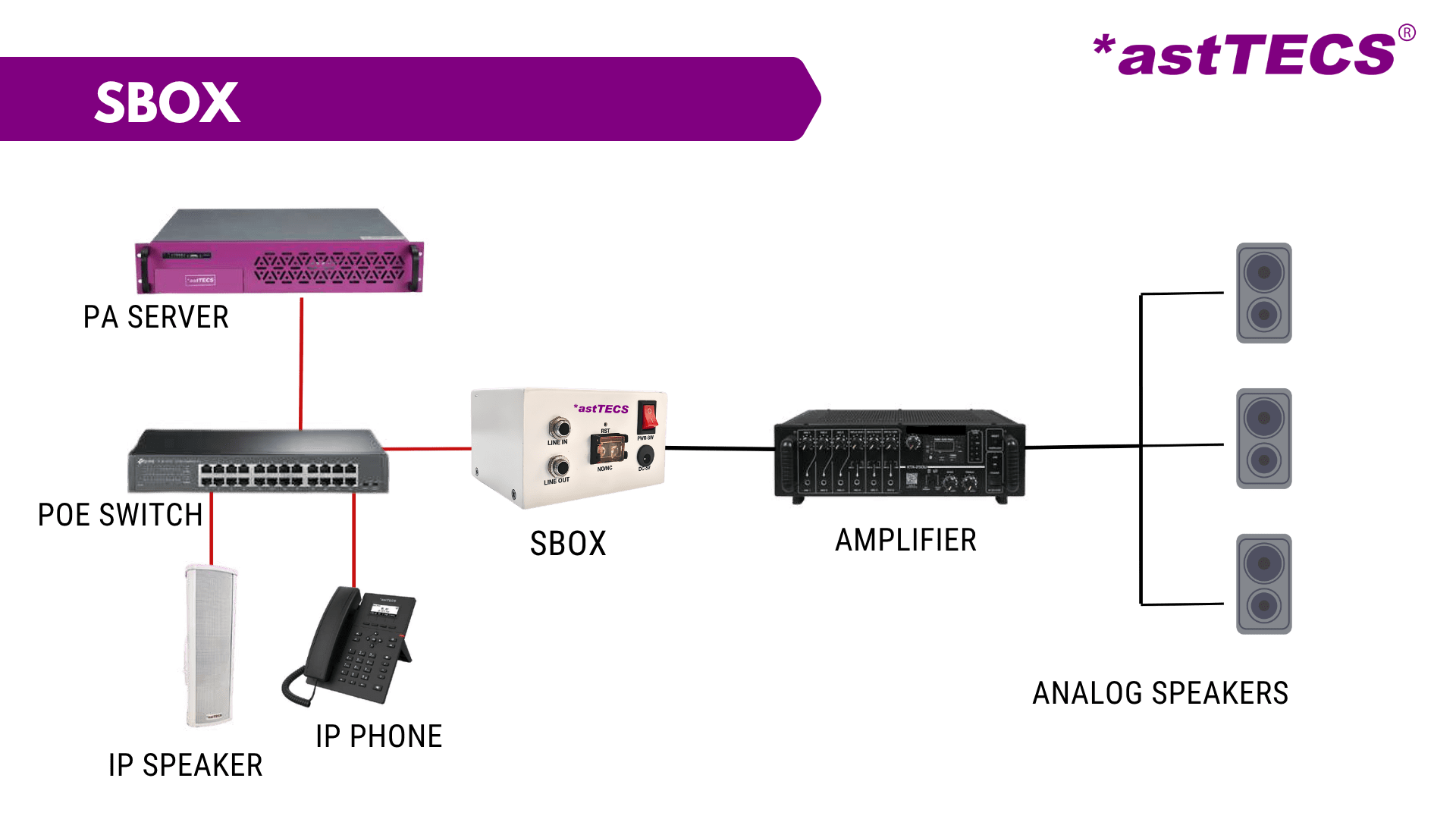
If your existing analog speakers and amplifier are in good working condition, you can continue using them by integrating the *astTECS SBOX. This smart converter connects your traditional analog PA system to an IP-based communication network, allowing you to modernize your campus communication without replacing your existing speaker infrastructure.
This makes the upgrade faster, more cost-effective, and future-ready.
What Is *astTECS SBOX?
The *astTECS SBOX is an Analog-to-IP Audio Converter designed to bridge the gap between traditional analog PA systems and modern IP-based communication systems.
Instead of replacing your existing speakers and amplifier, the *astTECS SBOX converts analog audio into digital audio signals to the IP network, enabling your current speaker system to work seamlessly with an IP-based PA solution.
This allows schools and colleges to enjoy advanced communication features while protecting their existing investment in analog infrastructure.
How Does the Conversion Work?
Converting an analog PA system into an IP-based system using the *astTECS SBOX is simple and requires minimal changes to the existing setup.
Step 1 – Assess the Existing PA System
The first step is to evaluate the current PA infrastructure, including:
- Existing analog speakers
- Amplifier
- Speaker wiring
- Announcement zones
If these components are functioning properly, they can continue to be used.
Step 2 – Install the *astTECS SBOX
The *astTECS SBOX is connected between the campus IP network and the existing analog amplifier.
It acts as a bridge, allowing the analog PA system to receive announcements from the IP-based communication platform.
Step 3 – Connect to the Campus Network
The SBOX connects to the school’s existing LAN/WAN network, enabling centralized control of announcements through the *astTECS IP PA software.
This also allows multiple buildings or blocks to be connected over the same network.
Step 4 – Configure Announcement Zones
Using the IP PA software, administrators can create multiple announcement zones, such as:
- Classrooms
- Administrative Offices
- Libraries
- Laboratories
- Hostels
- Playgrounds
- Auditoriums
This allows announcements to be broadcast only to the required areas instead of the entire campus.
Step 5 – Start Managing Announcements Digitally
Once the SBOX is configured, schools can easily:
- Make live announcements
- Schedule school bells
- Broadcast emergency alerts
- Send zone-wise announcements
- Manage the system remotely through a centralized dashboard
—all while continuing to use their existing analog speakers and amplifier.
Benefits of Converting an Analog PA System to IP
Lower Upgrade Cost
Since existing speakers remain in use, schools avoid the high cost of replacing hardware.
Centralized Management
Manage all announcements from a single software dashboard instead of multiple physical amplifiers.
Zone-Wise Communication
Broadcast announcements only to selected classrooms, buildings, or departments.
Emergency Broadcasting
Deliver instant emergency announcements across the campus during:
- Fire incidents
- Medical emergencies
- Security threats
- Evacuations
Scheduled Announcements
Automate:
- School bells
- Class change reminders
- Assembly announcements
- Holiday messages
Remote Access
Authorized staff can manage announcements from anywhere within the campus network.
Easy Expansion
As the school grows, additional buildings and speaker zones can be added without redesigning the entire communication system.
Analog PA vs Upgraded IP-Based PA
| Feature | Traditional Analog PA | Upgraded IP-Based PA |
|---|---|---|
| Existing Speakers | ✓ Continue Using | ✓ Continue Using |
| Centralized Management | Limited | Yes |
| Zone-Wise Announcements | Limited | Yes |
| Scheduled Bell System | Manual | Automated |
| Remote Access | No | Yes |
| Emergency Alerts | Basic | Instant & Centralized |
| Expansion | Difficult | Easy |
| Network Integration | No | Yes |
Where Can Schools Use an IP-Based PA System?
An upgraded IP PA system can be used across:
- Classrooms
- Administrative offices
- Libraries
- Laboratories
- Auditoriums
- Sports grounds
- Hostels
- Cafeterias
- Parking areas
- School buses (where supported)
Is It Worth Upgrading?
If your current analog speakers are working properly, replacing the entire system may not be necessary.
By upgrading only the communication backbone with *astTECS SBOX, schools can:
- Save installation costs
- Extend the life of existing equipment
- Improve communication
- Increase campus safety
- Prepare for future expansion
It is one of the most cost-effective ways to modernize campus communication.
Why Choose *astTECS IP PA Solution?
The *astTECS IP PA Solution helps educational institutions upgrade from analog to IP without unnecessary infrastructure replacement.
Key advantages include:
- Support for existing analog speakers
- SBOX (IP Audio Controller) integration
- Centralized web-based management
- Zone-wise announcements
- Automated school bell scheduling
- Emergency broadcasting
- SIP-based communication
- Easy scalability for future campus expansion
With *astTECS, schools can modernize their communication systems while protecting their existing investment.
Conclusion
Upgrading from an analog PA system to an IP-based communication system doesn’t have to be expensive or disruptive. By integrating *astTECS SBOX, schools can continue using their existing speakers while gaining advanced features such as centralized management, automated announcements, zone-wise communication, and emergency broadcasting.
For educational institutions looking to improve campus communication without replacing their current infrastructure, this approach offers the perfect balance of cost savings, scalability, and future readiness.















Leave A Comment